
Table of Contents
Highlights
- Small business owners lose 10 to 15 hours a week to admin work that no customer ever sees or pays for.
- Ten apps handle the biggest offenders, covering bookkeeping, scheduling, follow-ups, invoicing, and repeat customer questions.
- Adopting three well beats adopting ten badly, because half-configured tools cost more time than doing the work manually.
- The biggest gains come from connecting tools, not from any single app working alone.
- Automation matters most during trade show weeks, when leads pile up faster than anyone left in the office can handle.
You didn’t start a business to reconcile bank feeds and sort through the expenses and spreadsheets, instead of building what you dreamt of. But here you are.
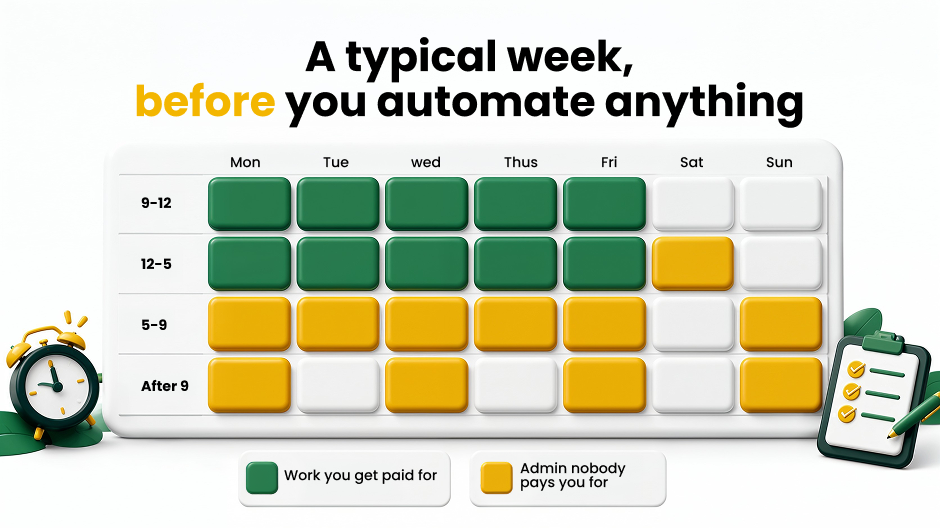
Somewhere between the client calls and the payroll runs, you have a second job that showed up uninvited. It has no title, and obviously nobody pays for it. It just fills your calendar as you chase invoices, copy-paste leads, and rewrite the same follow-up email for the fourth time this week.
So, let’s name the real problem.
Time was never the issue for owners; the main concern was the workflow.
The best productivity apps for small business owners in 2026 aren’t the flashy ones. They are the apps that disappear in the background and just work, saving a Sunday. They sit between your inbox, your bank, and your customers, doing the tedious work that you keep moving to tomorrow’s list.
Ten of them are below. Five you’ll recognize, five you probably won’t, and each one hands back hours you’re currently giving away for free.
The Cost Of “I’ll Just Handle It Myself”
Let’s put a number on the bleeding.
Nearly three of five small businesses are waiting longer to get paid, with invoices overdue by 30+ days, up from 47% last year. This leaves an average of $17.7K tied up in unpaid payments. People often mistake this for delivery issues, but the real problem is neglected follow-ups and routine tasks.
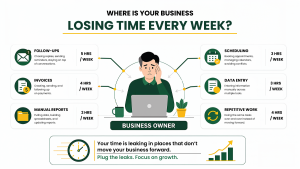
That money isn’t missing because the work wasn’t completed. It is stuck because follow-ups and routine tasks keep getting pushed aside.
Here’s where hidden costs pile up. You are paying for it with the one resource you can never get back: your time.
These operational gaps turn into lost opportunities. Delayed follow-up emails, invoices you’re waiting to send, and tasks you handle manually all slow your business down. What’s the solution?
The right business process automation tools help take those tasks off your plate so you can focus on growth. It’s already showing up in the numbers: 83% of growing small businesses use AI tools, versus 55% of those in decline.
Read that again. Adoption isn’t a tech decision anymore, but a trajectory indicator.
The Core Stack: 5 Best Productivity Apps for Small Business Owners
Start here. These fix the leaks you already feel every single week.
1. Automated Bookkeeping & Expense Tracking
The challenge: Matching receipts, evaluating transactions, and prepping monthly statements take more time than they should.
Use: Choose QuickBooks Online or Xero if your business needs advanced accounting features. Wave is also an option, offering free accounting software for small business owners who need basic bookkeeping and invoicing.
Why it works: Live bank feeds auto-categorize. Receipt photos scan and file themselves.
Saves: ~3.5 hours/week
2. Cross-Platform Workflow Integration
The challenge: Manually copy-pasting leads from forms, CRMs, spreadsheets, and then into emails. One lead, four windows, and you’re playing the role of a courier between them.
Use: Switch to Zapier or Make. Most business owners prefer these entry-level business process automation tools.
Why it works: One trigger fires ten actions. Set it once and replace the repetitive tasks.
Saves: ~4 hours/week
3. Visual Project Tracking
The challenge: Important updates get buried in Slack, project details live in different files, missed status checks.
Use: Opt for Asana or ClickUp.
Why it works: Assimilate projects, deadlines, and conversations in one place. Recurring tasks and templates help avoid rebuilding the same workflows every time.
Saves: ~3 hours/week
4. Employee Scheduling & Payroll
The challenge: Creating weekly schedules, managing last-minute absences, and calculating overtime is time-consuming.
Use: Homebase or Gusto are great productivity apps for small business owners.
Why it works: Geo-fenced features for mobile clock-ins. One-click tax filing. Employees can swap their own shifts.
Saves: ~2.5 hours/week
5. DIY Marketing Assets
The challenge: Waiting days for the designer to post slows your business’s marketing efforts and engagement.
Use: Canva is the best fit. Pair it with Buffer or Later, one of the best tools for scheduling social media posts without hiring an agency and draining the budget.
Why it works: Choose from a variety of brand templates to keep your content consistent, while ready-made designs help to build visuals faster.
Saves: ~2 hours/week
That’s a couple of hours! You could have invested that time in customers, strategy, and growth planning. And these savings are not limited to traditional business tools. Businesses using AI tools have significantly reduced manual work. A recent study from Business.com found that, on average, employees can save 5.6 hours per week while managers can save more than seven hours.
So the solution isn’t working extra shifts. It’s finding better ways to work faster, with fewer errors and glitches.
If you’re reading this, you could have guessed most of that list. Now let’s explore the next five best productivity apps for small businesses that your competitors are running that you were not aware of.
The Next-Gen Stack: 5 Apps Your Competitors Haven’t Found
This is where advanced business process automation tools stop saving minutes and start protecting strategy.
6. Defensive Calendar Scheduling
The challenge: Your calendar fills up before your priorities do. Client calls take over every open block, leaving little time for focused work.
Use: Reclaim.ai or Motion.
Why it works: These tools automatically adjust your schedule when meetings move, while protecting dedicated time for important tasks and deep work.
Saves: ~3.5 hours/week
7. Voice-to-Action Notes
The challenge: Thumbing through meeting notes on your phone between customer visits, sitting in a parking lot, and trying to capture all the details on the move.
Use: Consider using AudioPen or Otter.ai for effortless work.
Why it works: You will get clean bullet points, a running list of action items, or a drafted email ready to send after every meeting.
Saves: ~2 hours/week
8. Autonomous Receivables Chasing
The challenge: Writing awkward “just circling back” reminders to people who already owe you money, then waiting a week and writing another one.
Use: Chaser or PaidNice. Both plug into most automated ecommerce accounting tools for business growth stacks.
Why it works: The system detects your overdue invoices and runs a dunning sequence on its own without sending tone-adjusted follow-ups.
Saves: ~2 hours/week
9. Inbox Triage & Ops Agents
The challenge: Answering the same customer questions repeatedly and manually reviewing every lead eventually slows your team’s performance.
Use: Opt for AI workflow tools like Lindy AI or Relevance AI.
Why it works: Reviews incoming inquiries, checks your CRM, and drafts a reply for approval. The next-gen apps also integrate well with HubSpot, Pipedrive, or Zoho, working perfectly with the best CRM for small business teams.
Saves: ~4 hours/week
10. Automated Review Generation
The challenge: Every satisfied customer is a review you meant to ask for, and by the time you remember, they’ve moved on and so have you.
Use: Choose between NiceJob and Birdeye.
Why it works: Automatically sends review requests after a customer interaction. You can collect valuable feedback without manual follow-up. A business text messaging app like Podium also helps manage two-way customer conversations.
Saves: ~1.5 hours/week
Quick Comparison: Where Your Hours Actually Come Back
| Category | Recommended App | Hours Saved | Free Tier? |
| Bookkeeping | QuickBooks / Xero | 3.5 | Trial only |
| Workflow automation | Zapier / Make | 4.0 | Yes |
| Project tracking | Asana / ClickUp | 3.0 | Yes |
| Scheduling & payroll | Homebase / Gusto | 2.5 | Yes |
| Marketing assets | Canva | 2.0 | Yes |
| Calendar defense | Reclaim.ai / Motion | 3.5 | Yes |
| Voice notes | AudioPen / Otter.ai | 2.0 | Yes |
| Receivables | Chaser / PaidNice | 2.0 | No |
| Ops agents | Lindy AI | 4.0 | Credits |
| Reviews | NiceJob / Birdeye | 1.5 | Trial |
Wait! You don’t need to adopt all the applications at once. Your team might get confused, and the workflow will turn haphazard. Nobody does that. So, it’s better to pick any three.
Why This Matters When You Exhibit at a Small Business Expo?
The biggest mistake exhibitors make happens after the show floor closes.
Trade show weeks are the busiest. You connect with investors, business owners, and meeting prospects, having conversations and building connections. You spend twelve hours standing at a booth. Meanwhile, nobody is back at the office monitoring the operations.
That is where opportunities get lost. Leads sit untouched, and invoices get delayed. The follow-up email you were supposed to send Tuesday gets delayed until Friday. This can cause potential customers to forget the conversation.
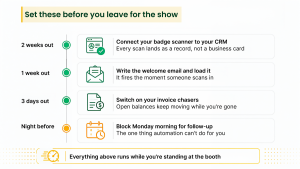
With the best productivity apps for small business, you can keep your workflow running smoothly while you focus on closing deals at the Small Business Expo trade show.
If you adopt marketing automation tools for small businesses, a welcome email is sent automatically the moment a lead scans your badge. When that lead is ready to buy, an e-signature app like Dropbox Sign gets the contract signed on the spot.
In fact, 9 in 10small business owners report weekly time savings from AI, with 29.7% saving six hours or more.
Six hours is a full show day. Want to use it well? Read our guide on how to get the most value from exhibiting before your next event.
The 3-Step Setup Rule (Avoid Tool Fatigue)
Stacks get buried when you buy ten apps in a single weekend. Instead, work smarter and follow this:
- Audit one leak. Identify where most of your time drains each week. It could be Invoicing, scheduling, or follow-up.
- Adopt one tool. Test a tool for 30 days. Ask your team to use it and flag what’s helpful and what falls short.
- Connect the pipes. Use native integrations first, and use Zapier only when native integrations don’t work.
The best productivity apps for small business owners fail for one reason: half-setup. A tool you configure on Tuesday and abandon by Friday costs more than doing it manually.
Final Thoughts: Every Hour You Save Is An Hour You Can Sell
You can only buy time for your business once you stop investing it in the wrong activities.
The owners thriving in 2026 aren’t just working harder. They built a stack, connected it, and checked on it monthly. Ten hours has a shape once you see it. No more Sunday-night receipt sorting, no more writing the “just circling back” email.
That’s the best return on the best productivity apps for small business owners. Not the software itself but the calendar space it hands back.
Here’s the catch. Reading about ten apps is easy. Picking the right ones for your business is much harder.
That’s exactly what a show floor is for. At Small Business Expo, you can sit down with the leaders who build these tools. Ask blunt questions. Watch a live demo before you spend a dollar. Speak up about your issues, and you’ll find solutions at every booth. Over 100,000 small business owners attend every year.
Some of them are your competitors, and they’re walking out with the shortlist you’re still Googling.

Frequently Asked Questions On Small Business Apps
What apps do small business owners actually use to save time?
Small business owners use applications such as QuickBooks, Asana, Canva, Zapier, and HubSpot to automate repetitive tasks. They can manage finances, projects, marketing, and customer relationship management through these applications while eliminating tedious activities and saving time.
What’s the best app for scheduling appointments?
Calendly, Motion, and Reclaim.ai are popular scheduling apps and considered the best productivity apps for small businesses. They help make appointments easy, avoid calendar clashes, and even let customers arrange meetings without any emails or manual coordination.
What’s the best invoicing app for a small business?
QuickBooks Online, FreshBooks, and Wave are among the most used invoicing apps for small businesses and growing enterprises. These applications help create invoices, track payments, send reminders, and organize financial records without spending hours on manual billing tasks.
Is there free accounting software for small businesses?
Yes, free accounting software like Wave helps small businesses manage basic bookkeeping, invoicing, and expense tracking. It is a practical option for freelancers and small teams that need simple financial management without monthly subscription costs.
How do I know which business tasks to automate first?
Start with tasks your team does regularly each week and that take a long time to complete. Consider starting with invoicing, scheduling, follow-up, and data entry. These tasks are likely to yield fast results, savings, and improved daily operations.
Related
You’re Losing 50 Hours a Year to Manual Payroll. Payroll Software for Small Business Gets Them Back
Why the Right Billing Software for Small Business is the Key to Scaling Revenue