

Table of Contents
Billing software for small business is the fastest way to get paid faster, reduce admin work, and stop chasing late payments.
Highlights
- Implementing billing software for small business reduces administrative overhead and eliminates manual errors that frequently delay payments.
- Automated features like recurring billing and scheduled payment reminders help maintain a healthy cash flow without requiring constant manual oversight.
- Selecting a billing software for small business that integrates with accounting software like QuickBooks simplifies tax preparation and ensures financial accuracy.
- Free tools like Zoho Invoice and Wave allow startups to manage up to 1,000 invoices annually without incurring monthly subscription costs.
Here are the top options to consider in 2026:
|
Software |
Best For |
Free Plan |
Starting Price |
|---|---|---|---|
|
Zoho Invoice |
Automation & volume |
Yes (up to 1,000 invoices/year) |
Free |
|
Wave |
Freelancers & solopreneurs |
Yes |
Free |
|
Square Invoices |
Retail & service businesses |
Yes |
$0/month |
|
FreshBooks |
Growing small businesses |
No |
$21/month |
|
Stripe Invoicing |
International sales |
No |
0.4% per invoice |
|
Harvest |
Freelancers tracking hours |
No |
$9/seat/month |
|
Xero |
Accounting integration |
No |
Varies |
|
Zoho Billing |
Subscriptions & compliance |
No |
$39/month |
Getting paid should be the easy part of running a business. But for most small business owners, it isn’t.
You send an invoice. Then you wait. Then you follow up. Then you wait again. Meanwhile, your cash flow tightens and your time disappears into a black hole of spreadsheets and email threads.
This is the billing trap — and millions of small businesses are stuck in it right now.
The retail billing software market is expected to reach $10.2 billion by 2033. That growth isn’t driven by large corporations. It’s driven by small business owners who finally got tired of manual invoicing and switched to smarter systems.
Whether you’re a freelancer sending five invoices a month or a growing service business managing dozens of recurring clients, there’s a billing software for small business built for your exact situation. This guide breaks down the best billing software for small business options, the key features to look for, and how to pick the right billing software for small business without wasting time or money.
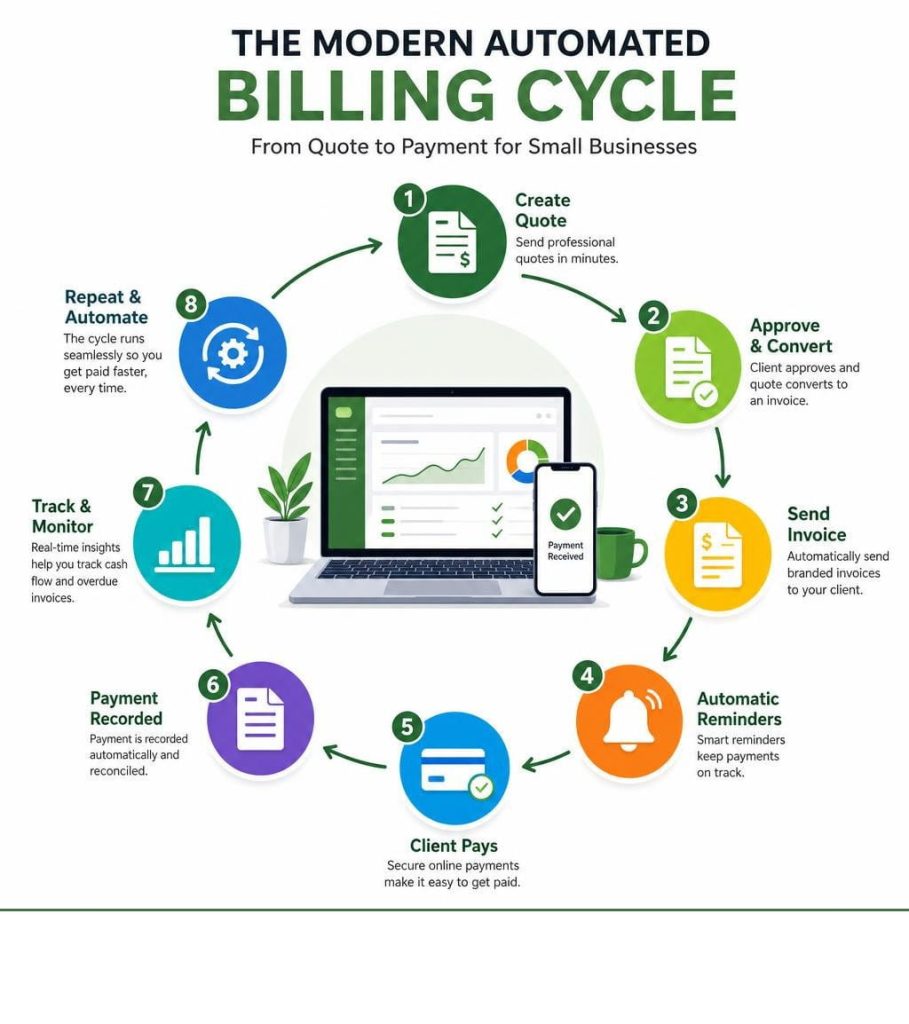
Why Legacy Invoicing is Killing Your Cash Flow: The Shift to Modern Billing Software for Small Business
Using manual spreadsheets, Word templates, or paper invoices is a quiet leak in your business’s financial bucket. When you manage your billing manually, you are not just wasting time—you are actively hurting your bottom line.
Manual invoicing is highly prone to human error, resulting in incorrect totals, missing sales tax calculations, or mismatched client details. These errors delay payments while you and your client trade emails to correct the record. Furthermore, without automated tracking, invoices easily slip through the cracks. It is incredibly common for a busy business owner to forget to send an invoice, or worse, fail to follow up on one that is weeks overdue.
Modern billing software for small business completely transforms this workflow. By automating the creation, delivery, and tracking of your bills, you eliminate the friction that keeps cash out of your bank account. When you implement a dedicated billing software for small business, you eliminate manual errors.
According to top CPAs, poor invoicing habits are among the most common cash flow killers for young firms. To keep your business healthy, you must establish Essential Bookkeeping Best Practices for Your Small Business. Standardizing your billing with a reliable billing software for small business ensures your financial records remain organized, accurate, and ready for tax season.
Transitioning to automated billing also prevents costly accounting mistakes. When you manually copy data from your timesheets or sales logs into an invoice, the risk of transposition errors is high. Reviewing Insights from a CPA: Common Accounting Mistakes to Avoid highlights how quickly minor manual errors can snowball into major audit headaches.
For local businesses operating in busy regional hubs, compliance is equally critical. If you are wondering, “What Accounting Software Should I Use For My Metro Atlanta Business“, the answer lies in selecting a billing software for small business that integrates seamlessly with your localized accounting and tax rules. Modern billing systems automatically calculate local state and municipal taxes, saving you from manual calculations and potential compliance audits.
The 2026 Playbook: Top Billing Platforms to Accelerate Revenue Growth
In 2026, billing software for small business is no longer just a digital filing cabinet for your receipts. It is a strategic tool designed to optimize revenue, reduce your Cost Per Lead (CPL) overhead, and maximize client lifetime value. The right billing software for small business will help you convert accepted estimates into paid invoices with a single click, keeping your cash flow predictable.

When selecting your platform, it is critical to balance software subscription costs against your payment processing needs. To understand the broader picture of how transaction fees and monthly costs impact your margins, review the current landscape of Best Credit Card Processing for Small Business.
Additionally, factoring in your software budget is crucial. Keeping an eye on Small Business Software Costs ensures that your tech stack remains highly profitable without eating away at your hard-earned margins.
Let’s look at the top-performing platforms categorized by their operational strengths to help you find the perfect match.
Best for Service-Based Businesses and Client Management
Service-based businesses—such as consultants, agencies, contractors, and local service providers—have unique needs when choosing a billing software for small business. They must manage the entire customer journey from the initial estimate to the final payment, often requiring robust scheduling and client communication tools.
- vcita: This platform is much more than a simple billing software for small business. It offers a complete, all-in-one business management suite. With vcita, you get online scheduling, a built-in CRM, email marketing, and a secure payment portal. Clients can book appointments, view outstanding invoices, and make payments online 24/7 without needing to install any software. You can easily check out the features by opting to try vcita for FREE.
- Wonderly: If you want to eliminate disconnected tools and repetitive manual work, Wonderly offers an exceptional billing software for small business experience. It allows you to manage everything from quote to contract to payment in a single space. You can build a custom estimate, send it to a client for an electronic signature, and automatically convert that signed document into an active invoice. Discover how to streamline your service business workflows at Wonderly.
Best for Scalable Subscriptions and Global Compliance
If your business operates on a recurring revenue model, or if you sell digital services and physical products across borders, you need an enterprise-grade engine that can manage complex subscription lifecycles, dunning management, and international tax compliance.
- Zoho Billing: Formerly known as Zoho Subscriptions, Zoho Billing has evolved into a comprehensive billing software for small business system. It is designed to handle multiple pricing models, including flat-rate, usage-based, and multi-tiered subscriptions. It offers hosted payment pages, automated dunning to recover failed credit card payments, and deep integration with the Zoho ecosystem. Explore its robust capabilities at Zoho.
- Xero: Widely loved by accountants worldwide, Xero is an excellent billing software for small business that excels at keeping your billing and overall financial ledgers perfectly synchronized. It allows you to create professional, branded templates, track invoice statuses in real time, and accept instant online payments via regional payment gateways. It also supports e-invoicing for secure, direct system-to-system transactions. Learn more about Xero’s US features at Billing and Invoicing Software for US Small Businesses.
Best for Solopreneurs, Freelancers, and Startups
For early-stage startups, solo consultants, and creative freelancers, simplicity and cost are the primary decision drivers. You do not need complex subscription logic; you need clean, professional invoices that make you look established and get you paid quickly.
- Wave: Wave is an incredibly popular billing software for small business among freelancers and contractors because its core invoicing and bookkeeping software is completely free. You only pay standard transaction fees when your clients pay online via credit card or ACH transfer. It also features a clean dashboard that automatically updates your accounting ledgers when an invoice is marked as paid. Start invoicing for free by visiting Wave: Small Business Software – Wave Financial.
- Mercury: Known for its premium banking and financial infrastructure built for startups, Mercury offers a highly intuitive billing software for small business tool. It is perfect for founders who want to manage their incoming and outgoing cash in one centralized location without locking themselves into expensive, overly complex software early on. See how it fits your startup workflow at Best invoicing software for startups and small businesses – Mercury.
- FreshBooks: FreshBooks is an incredibly user-friendly billing software for small business designed specifically for self-employed professionals and small teams. It excels at time tracking, project collaboration, and expense management, making it incredibly simple to log billable hours and automatically add them to your client’s monthly bill. Check out their plans at FreshBooks: Invoice and Accounting Software for Small Businesses.
Maximizing Efficiency: Key Features to Demand in Your Tech Stack
To build a highly efficient business, your billing software for small business must work harmoniously with the rest of your tools. A fragmented tech stack leads to data silos, manual double-entry, and ultimately, lost revenue.

When designing your ideal operational setup, it is helpful to look at the bigger picture. Reviewing the Top Tech Stack Tools Every Small Business Needs will help you understand how your billing software for small business fits into your broader digital ecosystem.
Furthermore, integrating your billing system with a customer database is incredibly powerful. You can read more about Harnessing the Power of a CRM for Business Growth and Success to see how combining customer relationships with transaction history can accelerate your business growth.
Core Automation Capabilities of Modern Billing Software for Small Business
The most valuable asset for any small business owner is time. Your billing software for small business should do the heavy lifting for you through automated workflows:
- Recurring Invoices: Set up a schedule once for your retainer or subscription clients, and let the software automatically generate and send the bills on the same day every month.
- Automatic Payment Reminders: Instead of playing the role of the “bad guy,” let the system automatically send polite reminder emails to clients three days before, on the due date, and five days after an invoice becomes overdue.
- Card-on-File Billing: Securely save your client’s payment information (with their explicit permission) to automatically charge their card as soon as an invoice is generated.
For businesses looking for a highly reliable, free tool to automate their billing and accept multiple payment methods (including Apple Pay, Google Pay, and in-person Tap to Pay), check out Free Invoicing Software – Square.
Integration Ecosystems for Billing Software for Small Business
Your billing software for small business should never operate on an island. It must integrate seamlessly with two critical business functions: inventory management and core accounting.
If you sell physical products, real-time inventory synchronization is vital. When an invoice is paid, your billing software for small business should automatically update your stock levels to prevent overselling. To learn how to set up these automated workflows, check out The Beginner’s Guide to Asset and Inventory Management Software.
On the accounting side, QuickBooks remains the industry gold standard. Manually exporting CSV files and importing them into your ledger is a recipe for errors. Instead, look for a platform that features native, real-time sync with QuickBooks.
Strategic Selection: How to Choose the Perfect Platform for Your Operations
Choosing the right billing software for small business requires a clear understanding of your current operational volume and your future growth plans. Do not make the common mistake of choosing a billing software for small business solely because it has the most features; instead, focus on finding a tool that matches your actual daily workflow.

If you are currently transitioning away from manual record-keeping, it is helpful to know What Spreadsheets to Keep for a Small Business during your migration phase.
As your transaction volume grows, having a structured approach to Small Business Accounting will ensure that your billing software for small business choices scale smoothly alongside your revenue.
Frequently Asked Questions about Small Business Billing
Is there a completely free billing software for small business available for startups?
Yes, several platforms offer excellent free plans. For example, Zoho Invoice is completely free for up to 1,000 invoices per year (with some caps on users and clients). Wave and Square Invoices also offer robust free plans with no monthly subscription fees, meaning you only pay standard transaction processing fees when your customers choose to pay online via credit card or bank transfer.
How does modern billing software for small business protect sensitive financial data?
Reputable billing platforms prioritize security by utilizing 256-bit SSL encryption for all data transmissions. They also maintain strict PCI-DSS Level 1 compliance, which is the highest security standard in the payment card industry. This ensures that your business and your customers’ sensitive credit card details are securely stored and protected against unauthorized access.
Can billing software for small business operate offline during internet outages?
While most modern billing tools are cloud-based and require an active internet connection to sync data, some point-of-sale (POS) and desktop-based billing systems offer robust offline modes. These systems allow you to continue generating invoices and recording sales locally during an outage. Once your internet connection is restored, the software automatically syncs the offline data back to the cloud.
Final Thoughts
Transitioning from manual invoicing to a modern billing software for small business is one of the smartest investments you can make. By automating your payment collections, reducing administrative errors, and offering your clients modern payment options, you secure your cash flow and free up valuable hours to focus on scaling your operations.

Choosing your billing software for small business is just one piece of the puzzle. To truly accelerate your growth, build strategic partnerships, and learn from top industry experts, consider attending a local business conference.
Small Business Expo organizes America’s largest national B2B conferences and networking events, connecting over 100,000 small business owners annually across major US cities. Attendees gain free access to educational workshops, expert speakers, and diverse exhibitors.
Ready to streamline your entire operational workflow? Take the next step by exploring our comprehensive guide to the Best Small Business Management Software today!