

Table of Contents
Highlights
- A website launch checklist helps small businesses identify broken forms, slow pages, missing tracking, weak mobile layouts, and indexing problems before customers encounter them.
- Technical SEO checks in a website launch checklist should include title tags, meta descriptions, XML sitemaps, robots.txt rules, redirects, indexing settings, HTTPS, and site ownership.
- A functional website launch checklist requires testing forms, autoresponder emails, CRM routing, checkout processes, calendars, links, browsers, and physical mobile devices.
- A launch-day website launch checklist should address DNS changes, staging noindex directives, backups, SSL certificates, redirects, caches, and live smoke tests.
- Small businesses should avoid Friday launches because a website launch checklist cannot eliminate every unexpected payment, server, or configuration issue.
A website launch checklist helps a U.S. small business catch the problems that can cost qualified leads on day one: broken forms, slow pages, missing tracking, weak mobile layouts, and pages Google cannot index.
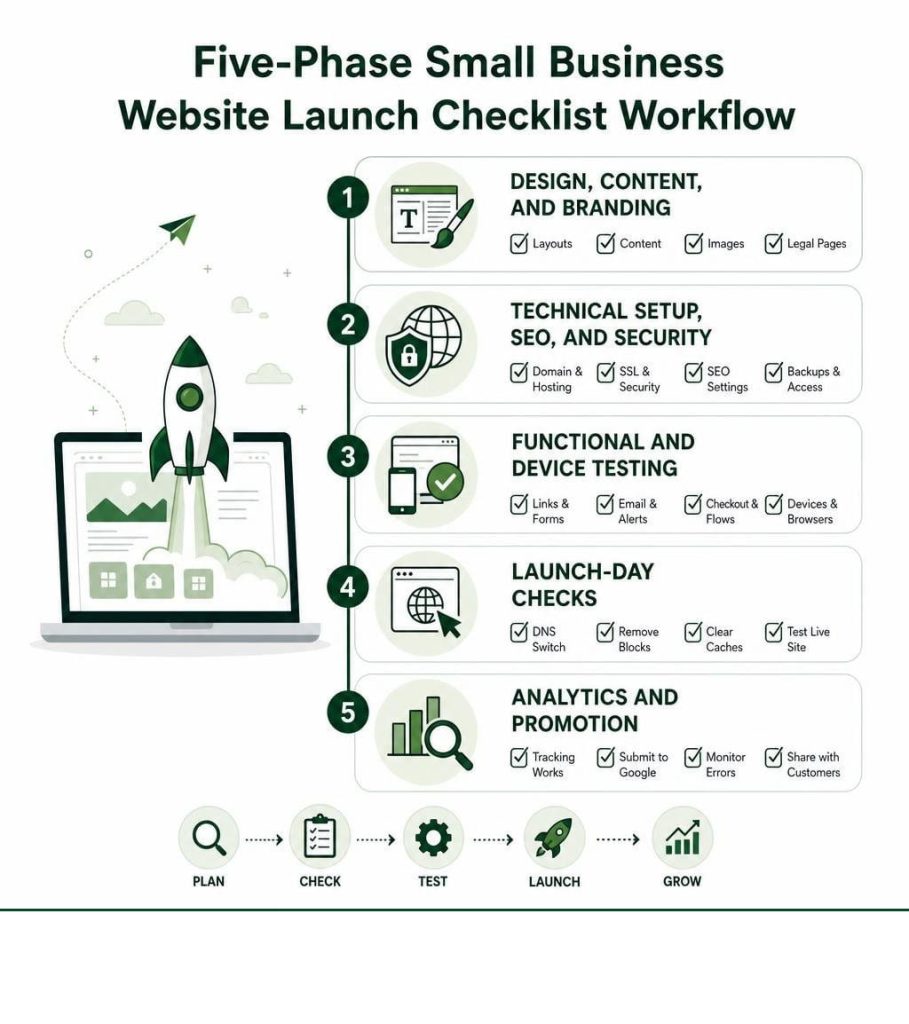
Use this quick five-phase checklist before you announce your new site:
- Phase 1: Design, content, and branding – Review page layouts, proofread copy, optimize images, and publish required legal pages.
- Phase 2: Technical setup, SEO, and security – Confirm your domain, hosting, SSL certificate, redirects, search settings, backups, and access controls.
- Phase 3: Functional and device testing – Test links, forms, email alerts, checkout flows, calendars, browsers, and real mobile devices.
- Phase 4: Launch-day checks – Switch DNS carefully, remove staging blocks, clear caches, and test the live site immediately.
- Phase 5: Analytics and promotion – Confirm tracking works, submit key pages to Google, monitor errors, and share the launch with customers.
A website is more than a digital brochure. It is often a small business’s first sales conversation. If a visitor cannot find a service, trust a checkout, or complete a contact form, the business may lose a lead before anyone has a chance to follow up.
The goal is not perfection for its own sake. It is a site that is clear, fast, trustworthy, and ready to turn attention into measurable actions such as calls, appointments, quote requests, email signups, and sales.
For a 2026 launch, that means checking the full path from search result to conversion. Search visibility, mobile usability, security, page speed, and analytics all affect whether marketing spend produces qualified leads at a sustainable cost per lead.
This guide breaks the work into five practical phases, then covers the specialized checks that blogs, portfolios, event calendars, and online stores need before going live.
Phase 1: Essential Design, Content, and Branding Website Launch Checklist
Before opening your digital doors to potential customers, the surface-level components of your website must project complete professionalism and structural clarity. Reviewing the core design elements and verifying content integrity ensures your site immediately builds trust. Knowing things needed in a business website gives you a strong baseline for balancing aesthetics with direct response functionality.
Design Consistency and Visual Polish
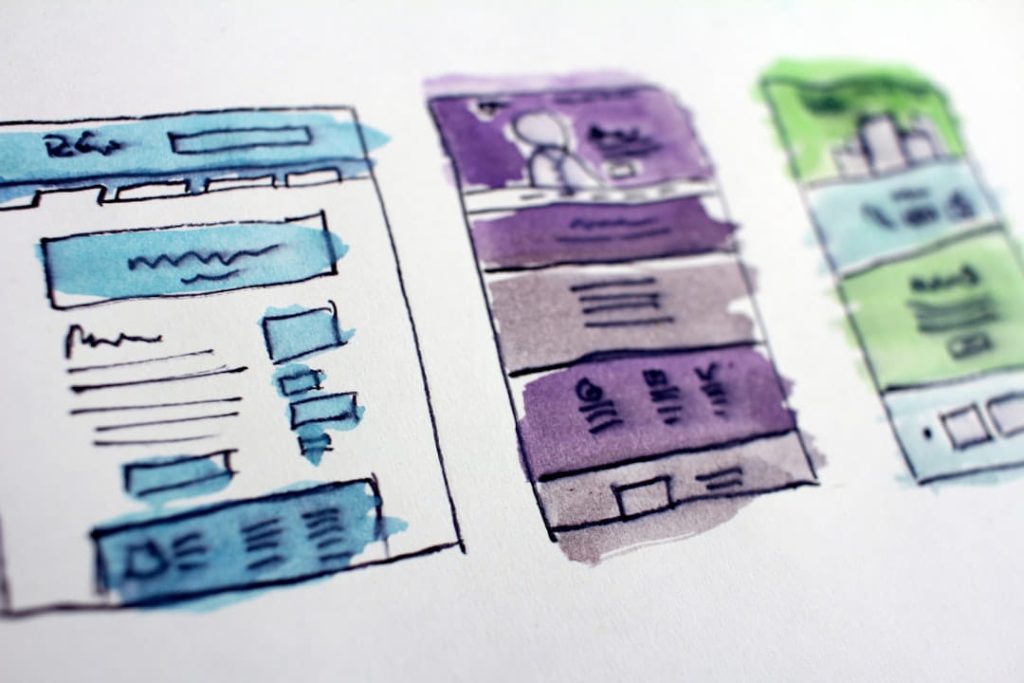
A disjointed layout weakens your brand identity and drives away prospective clients. Conducting a strict visual design sweep allows you to identify subtle visual defects before your visitors do.
- Typography Hierarchy: Confirm that heading tags follow a strict visual order (H1 to H3) with uniform font choices, consistent line heights, and balanced paragraph spacing across all landing pages.
- Color Palette and Contrast: Verify background and text contrast ratios to meet basic readability standards. High-contrast text keeps reading effortless for visitors browsing on dim screens or under direct sunlight.
- Drop Shadows and Spacing: Ensure drop shadow blur radiuses, border paddings, and element margins remain uniform across sections to establish a cohesive visual rhythm.
- High-Density Graphics Audit: Upload graphics at twice their display dimensions (2x resolution) so logos, badges, and interface icons render crisp on modern high-DPI mobile and desktop screens.
Content Proofreading and Legal Compliance
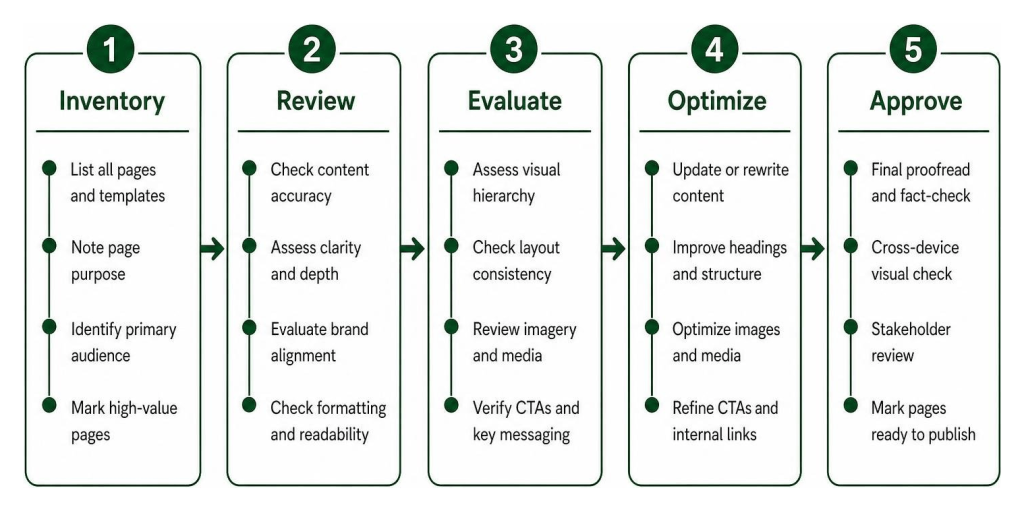
Polished design cannot compensate for typographical errors or missing legal protections. Crafting quality content for your small business website requires an exhaustive sweep of all written copy and legal structures.

- Copy Proofreading: Read all text out loud or utilize automated grammar auditors to catch typos, awkward phrasing, and grammatical mistakes.
- Placeholder Text Removal: Search your entire staging site database for leftover “lorem ipsum” filler text, placeholder contact phone numbers, or dummy staff names.
- Mandatory Legal Footers: Ensure every page links to a comprehensive Privacy Policy, Terms of Service, and Disclaimer page. For U.S. small businesses collecting consumer data, incorporating clear California Consumer Privacy Act (CCPA) privacy disclosures and opt-out controls is essential.
- ADA and Accessibility Basics: Ensure images feature descriptive alt text tags and touch targets measure at least 44×44 pixels to satisfy baseline Web Content Accessibility Guidelines (WCAG AA).
Phase 2: Technical Infrastructure, SEO, and Security Architecture
A visually stunning site fails to produce qualified leads if search engines cannot crawl it or if security vulnerabilities compromise visitor trust. Establishing a rock-solid technical setup protects your digital infrastructure and organic growth strategy. Resources like The 26-Point Website Launch Checklist | Steady Scaling emphasize that fixing foundational backend issues prior to launch prevents costly technical debt down the road.
On-Page SEO and Search Technical Website Launch Checklist
Optimizing your site for organic visibility requires methodical configuration of meta elements, structural architecture, and crawler directions following Google Search Central Technical SEO Documentation. Reviewing SEO marketing for small business will align your structure with buyer intent, while avoiding tactical missteps outlined in don’t do these 5 things for your website’s SEO.

- Title Tags and Meta Descriptions: Write unique meta title tags kept under 60 characters for every page. Create targeted meta descriptions between 135 and 160 characters. That search engine algorithms rewrite approximately 70% of meta descriptions on search results pages to better match visitor queries, making clear primary context essential.
- Single H1 Tag Structure: Confirm that every page contains exactly one primary H1 tag that matches the main target keyword, supported logically by subordinate H2 and H3 subheadings.
- XML Sitemap Submission: Generate a clean XML sitemap excluding thin tag pages, admin URLs, or staging parameters, ready for submission directly to search engine webmaster tools.
- Robots.txt Inspection: Examine your root
robots.txtfile to verify that crawling rules do not accidentally block search engine spiders from indexing your main content directories. - 1-to-1 Redirect Mapping: If executing a site redesign or domain move, construct a spreadsheet matching every old URL to its corresponding new destination page. Implementing precise 301 redirects prevents 404 errors, preserving existing domain authority and inbound link equity.
Page Speed and Performance Optimization
Page load speed directly influences bounce rates, visitor conversion, and search ranking rankings. Implementing performance optimizations ensures your web pages load almost instantaneously.
- Core Web Vitals Thresholds: Test key pages using speed diagnostic tools to confirm your site meets key thresholds: Largest Contentful Paint (LCP) under 2.5 seconds, Interaction to Next Paint (INP) under 200 milliseconds, and Cumulative Layout Shift (CLS) under 0.1.
- Modern Image Formats: Compress static images into WebP or AVIF formats, ensuring individual asset file sizes stay under 200KB without visible quality loss.
- Lazy Loading Implementation: Apply native
loading="lazy"attributes to below-the-fold images and embedded assets so browsers prioritize above-the-fold rendering. - Server Caching and Minification: Configure browser caching headers to store static assets for up to one year, and minify all CSS stylesheet and JavaScript bundle files.
Phase 3: QA, Cross-Device Functionality, and E-Commerce Testing
Functional testing validates that every interactive element on your site performs reliably under real-world usage. Referencing tools like the Website Launch Checklist Generator — Free Pre-Launch Tasks & Checklist Tool | WebToolsHQ can help structure your testing workflow. Ensuring seamless interactivity across different devices is central to modern small business website design 2026.

Functional QA and Lead Capture Website Launch Checklist
Your lead capture mechanisms are your primary conversion driver. Any breakdown in form delivery directly increases your Cost Per Lead (CPL).

- Form Submission Validation: Submit test inquiries through every form on the site—including contact boxes, lead magnet downloads, and quote request panels—testing both valid entries and invalid data to ensure validation prompts trigger properly.
- Autoresponder and CRM Routing: Verify that autoresponder confirmation emails arrive in customer inboxes immediately upon form submission, and check that lead details sync seamlessly into your CRM or marketing automation platform.
- Branded 404 Error Page: Design a helpful, branded 404 error page containing clear navigation paths back to high-value pages, helping recover lost visitors who land on expired links.
- Cross-Browser Verification: Perform visual and functional QA testing across dominant web browsers. Recent web metrics reveal Chrome and Safari represent 91% of global web traffic, making full compatibility across these two engine families your highest testing priority. Legacy environments like Internet Explorer now account for under 1% of total traffic, meaning testing time is better spent optimizing modern mobile viewports.
Specialized Page Testing for Blogs, Calendars, and E-Commerce
Different page types require targeted QA validation protocols before public deployment:
- E-Commerce Checkout Flows: Process test purchases using gateway sandbox environments to confirm price calculations, tax tables, shipping rules, promo codes, and automated receipt emails work flawlessly. Make a small live $1 transaction post-go-live to confirm live merchant processing.
- Blog and Portfolio Displays: Verify author bio boxes, categories, RSS feed outputs, comment spam protections, and featured image aspect ratios across all blog posts and portfolio case studies.
- Interactive Calendar Tools: Test scheduling widgets, time zone conversions, appointment booking confirmation scripts, and calendar sync integrations to guarantee seamless client onboarding.
Phase 4: Launch Day Go-Live Protocol and DNS Switch
Launch day execution requires strict technical sequence management to prevent unnecessary site downtime or indexing hiccups. Guides such as Your complete website launch checklist highlight that following a step-by-step protocol reduces deployment anxiety for small business owners.
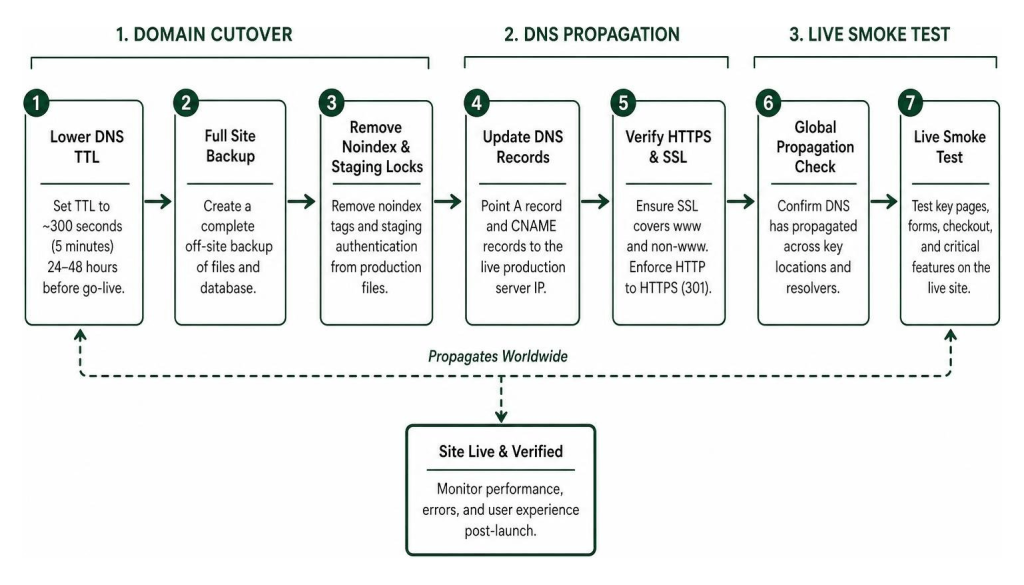
- Lower DNS TTL Settings: 24 to 48 hours before planned go-live, lower your domain’s Time-To-Live (TTL) setting in your DNS panel to ~300 seconds (5 minutes). This ensures global DNS resolvers update quickly during cutover.
- Execute Full Site Backup: Take a complete off-site snapshot backup of your staging environment files, custom code base, and database tables.
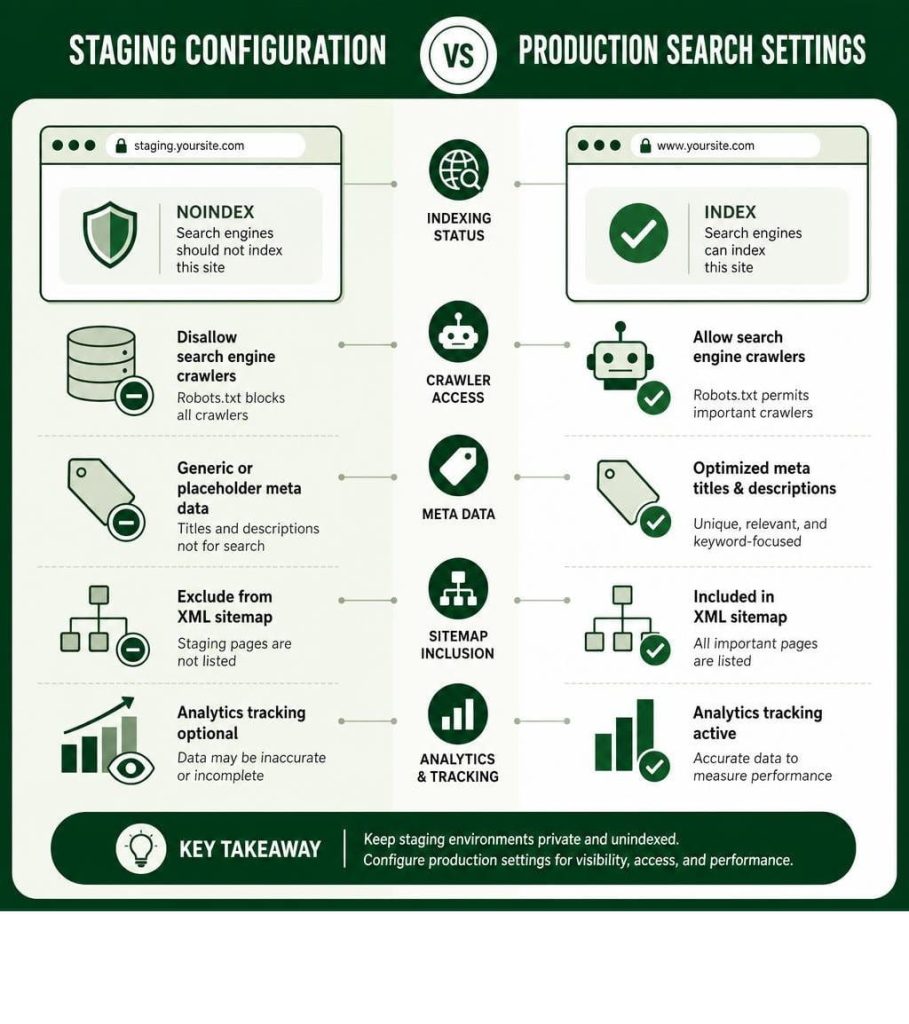
- Remove Staging Noindex Directives: Remove any
<meta name="robots" content="noindex">tags or staging HTTP basic authentication prompts from production template files. - Update DNS Records: Update your root domain’s A record and CNAME settings to point directly to your live production server IP address.
- Verify HTTPS and SSL Certificates: Confirm your SSL certificate covers both www and non-www domain variations, enforcing automatic 301 redirects from HTTP to HTTPS.
- Perform Live Smoke Testing: Execute immediate live end-to-end tests on production: submit a form, load key product pages on mobile devices, and test navigation links.
Note: Avoid launching a website on a Friday. Deploying early on a Tuesday or Wednesday morning provides your technical support team ample operational runway to address unexpected glitches during standard business hours.
Phase 5: Post-Launch Analytics, Marketing, and Lead Acceleration
Going live is only the beginning of your website’s growth lifecycle. Establishing real-time monitoring and active post-launch marketing ensures your modern web assets generate qualified leads while lowering your customer acquisition costs. Applying strategic steps like those in 5 small business website redesign tips to attract more customers accelerates your initial momentum.
Analytics Integration and Immediate Monitoring
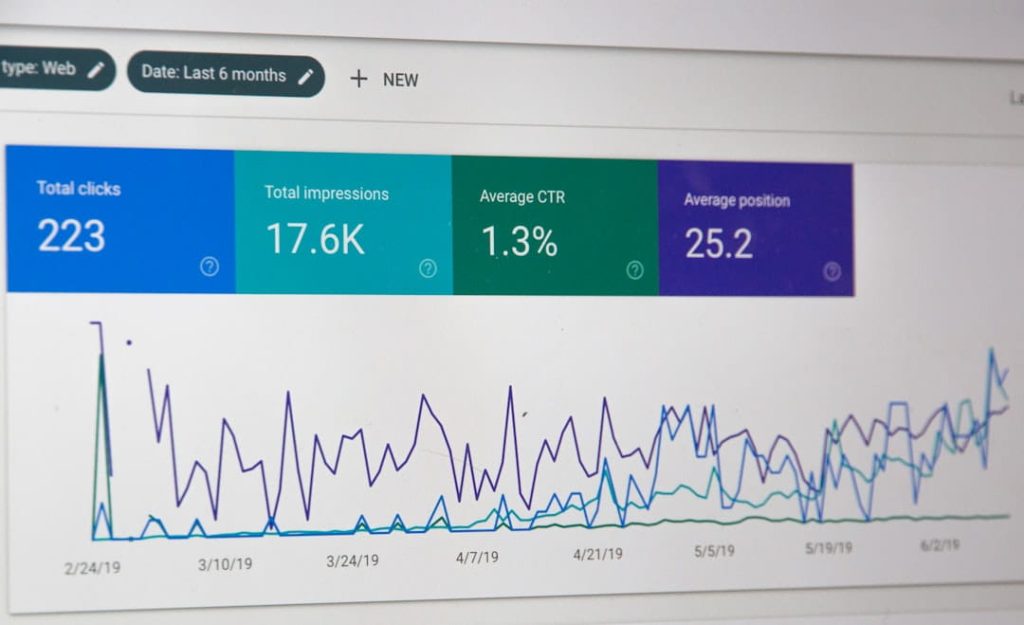
Without analytics, evaluating marketing performance is pure guesswork. Confirming data capture routines gives you a clean performance baseline.
- Google Analytics 4 (GA4) Verification: Verify that GA4 tracking scripts trigger properly across every page. Test real-time reporting by visiting the live site and verifying active user hits.
- Conversion Event Tracking: Define specific event triggers for critical conversion milestones—such as thank-you page views, click-to-call phone buttons, and form submissions—to monitor cost per lead accurately.
- Google Search Console Submission: Log into Google Search Console, claim your live domain property, submit your XML sitemap URL, and request indexing for high-priority landing pages.
- Uptime and Error Monitoring: Set up automated third-party uptime monitoring tools to receive real-time notifications via SMS or email if server downtime occurs.
Post-Launch Marketing and Audience Engagement
Once technical health is confirmed, initiate your public launch campaign to drive targeted traffic to your fresh digital experience.
- Email Announcements: Send a launching announcement newsletter to your existing subscriber database highlighting new features, updated services, or exclusive launch offers.
- Social Media Campaigns: Share teaser previews, video walkthroughs, and behind-the-scenes content across your active social media accounts.
- Local Profile Sync: Update your Google Business Profile, local directory entries, and social bios with your current website link to maximize local SEO benefits.
Final Thoughts: Drive Qualified Leads with a Flawless Site Launch
Deploying a business website is a significant milestone for any growing company. By systematically working through a comprehensive website launch checklist, you remove guesswork, protect your brand identity, safeguard search engine rankings, and deliver a frictionless user experience from the moment your domain opens to the public.
To maximize your revenue growth and lower your Cost Per Lead (CPL) in 2026, pair your digital launch strategy with powerful real-world networking opportunities. Small Business Expo organizes America’s largest national B2B conferences and networking events for small business owners across major U.S. metropolitan centers. Attending our events gives you free access to educational workshops, industry experts, and peer networks that help transform your fresh digital web presence into a consistent pipeline of qualified sales leads.
For more actionable strategies on building a high-converting web presence, explore our detailed guide on 7 expert tips how to make a website for a small business or register today to attend an upcoming Small Business Expo event near you!
Frequently Asked Questions About Your Small Business Website Launch
How long before going live should I start running through a website launch checklist?
You should begin running through your initial pre-launch checklist at least two to four weeks prior to your targeted go-live date. Front-loading steps like copywriting, image compression, legal compliance review, and accessibility audits gives your team adequate time to resolve unexpected design responsive issues or technical glitches without forcing a delayed deployment date.
Why is launching a website on a Friday strongly discouraged?
Launching a website on a Friday leaves your business vulnerable if unexpected bugs, payment gateway connection failures, or server configuration errors occur over the weekend. Publishing early on a Tuesday or Wednesday morning ensures your internal team, hosting support staff, and technical partners are fully available during regular business hours to resolve emergency issues immediately.
How do I ensure search rankings do not drop after launching a website redesign?
Preserving organic search rankings during a redesign requires creating a strict 1-to-1 301 redirect map that points every legacy URL to its exact counterpart on the new site. Furthermore, maintaining key heading structures, preserving high-performing page copy, keeping identical URL permalink formats where possible, and submitting your XML sitemap to search engines immediately after cutover prevents organic traffic loss.
What is the most critical technical SEO mistake to avoid on launch day?
The single most damaging technical SEO mistake is accidentally leaving staging indexing blocks active on your live production site. Forgetting to remove a noindex meta tag or leaving Disallow: / inside your root robots.txt file prevents search engine bots from indexing your site, causing organic traffic and search visibility to plummet until corrected.
How do I thoroughly test contact forms and payment gateways before going live?
Test contact forms by submitting both valid test data and intentionally incomplete inputs to ensure error prompts, success notifications, autoresponder emails, and database routing function smoothly. For payment gateways, run dummy transactions using the gateway’s sandbox environment, and follow up immediately after going live by purchasing a $1 test item with a live credit card to verify real-time processing.
Which browsers and device screen sizes are most critical for pre-launch QA?
Pre-launch quality assurance should prioritize Google Chrome and Apple Safari, as these two browser engines account for roughly 91% of global web traffic. Because over half of all web traffic originates from mobile devices, test layouts extensively on physical iOS and Android smartphones, paying close attention to navigation drawer toggles, viewport scaling, and touch targets.
Are small business websites required to have a privacy policy and cookie banner at launch?
Yes, any small business website that collects personal user data—such as names, email addresses, phone numbers, or analytics tracking cookies—must display a clear Privacy Policy page linked in the footer. Depending on your target audience and regulatory requirements (such as CCPA in California), implementing a cookie consent banner that explicitly discloses tracking practices is essential for legal compliance.