

Table of Contents
Disclaimer: The content in this article is for general informational purposes only and does not constitute legal, tax, financial, or professional compliance advice. Small Business Expo is not a law firm, does not provide legal or professional advisory services, and does not act in any legal capacity. Readers should consult their qualified attorney, tax professional, or financial advisor before implementing any compliance frameworks, safety protocols, or business structures mentioned herein.
Highlights
- Businesses that document their procedures using a standard operating procedure template can reduce onboarding time by 40% to 60% compared to teams relying on verbal handoffs, according to industry benchmarks.
- Missing or outdated SOPs are consistently cited as one of the top three findings in ISO 9001, FDA, and SOC 2 audits, making a standard operating procedure template essential for compliance and audit readiness.
- Without a consistent standard operating procedure template in place, businesses experience silent revenue leakage through inconsistent service delivery, prolonged onboarding cycles, and inefficient follow-up processes that drive up cost per lead.
- AI tools like Microsoft Copilot can generate a customized standard operating procedure template in seconds by prompting with your business context, existing emails, or rough notes — turning a blank page into a structured draft immediately.
- Choosing the right standard operating procedure template format — step-by-step, hierarchical, checklist, or flowchart — depends on the complexity of the task, with simpler processes benefiting from checklists and complex decision-heavy workflows requiring flowcharts.
A standard operating procedure template is a pre-built document structure that tells your team exactly how to complete a recurring task — consistently, every time, without someone having to explain it from scratch.
If you need a quick answer, here’s what an effective SOP template includes:
- Title and document ID — unique identifier, version number, and effective date
- Purpose and scope — what the process covers (and what it doesn’t)
- Roles and responsibilities — who does what, using a RACI matrix
- Materials and prerequisites — tools, access, or conditions needed before starting
- Numbered procedural steps — one action per step, written in plain language
- Acceptance criteria — measurable pass/fail checkpoints
- Revision history — a dated log of every update made to the document
Here’s the uncomfortable truth most small business owners learn too late: if a process only lives in someone’s head, it’s not a process — it’s a liability.
When your best employee quits, when you bring on three new hires at once, when an auditor walks through the door — that’s when the absence of documented procedures becomes a very expensive problem.
The numbers back this up. Businesses that document their procedures can reduce onboarding time by 40 to 60% compared to teams that rely on verbal handoffs. And missing or outdated SOPs are consistently cited as one of the top three findings in ISO 9001, FDA, and SOC 2 audits.
For small businesses trying to scale without chaos, a solid SOP template isn’t a nice-to-have. It’s the foundation everything else runs on.
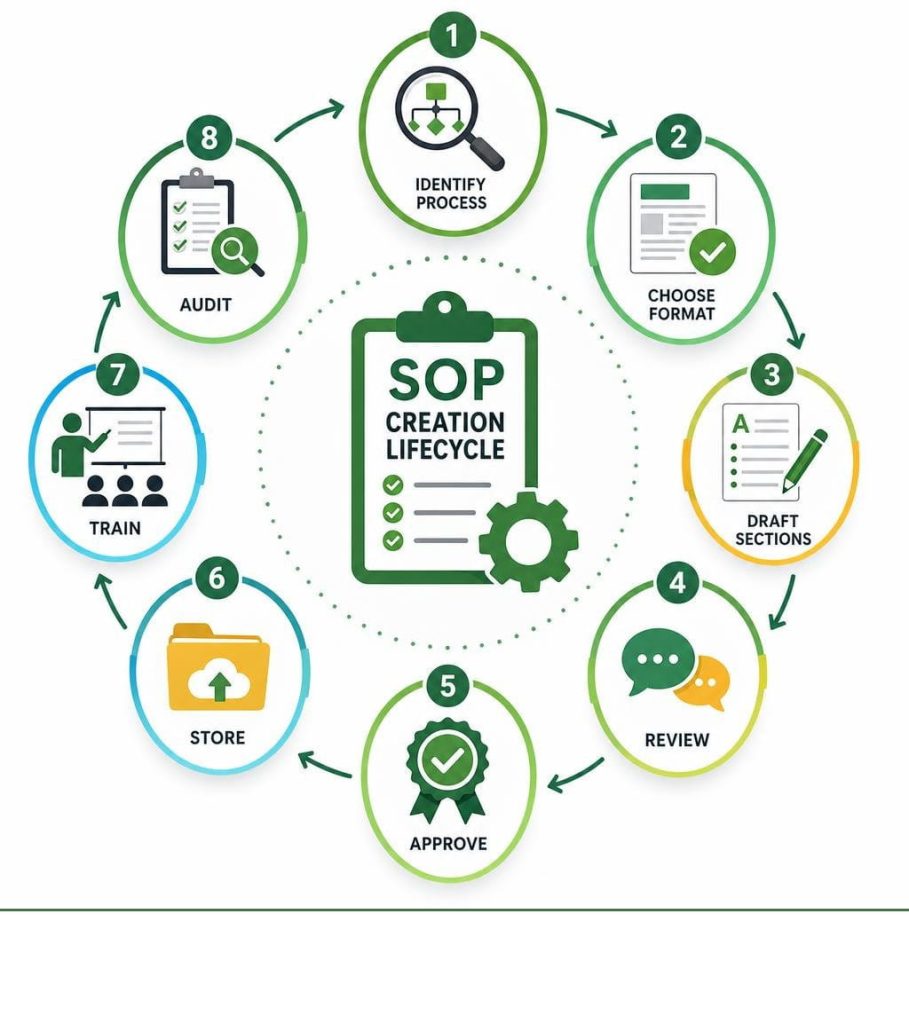
Why Your Business is Leaking Revenue Without Documented SOPs
Many business owners in bustling commercial hubs like Atlanta, Houston, and Boston find themselves trapped in a daily cycle of putting out fires. They spend valuable hours answering the same operational questions over and over. This operational friction does not just cause headaches; it directly drains your bottom line.

Without a consistent standard operating procedure template in place, your business experiences silent revenue leakage. This leakage happens through inconsistent service delivery, prolonged employee onboarding cycles, and a high cost per lead (CPL) due to inefficient follow-up processes. By standardizing lead management, businesses can hit lower CPL targets and maximize marketing ROI.
When your team relies on memory rather than documented steps, mistakes happen. A customer service representative might forget to log a lead correctly, or an administrative assistant might miss a step in your billing cycle. These small errors compound into massive financial leaks over time.
Additionally, relying heavily on a few key employees creates a dangerous key-person dependency. If your lead technician or office manager in Dallas takes an unexpected leave of absence, does your business grind to a halt? Having a library of documented SOPs protects your business from knowledge loss and ensures operational continuity.
For businesses looking to secure larger contracts or prepare for external audits, documentation is non-negotiable. Regulatory frameworks and quality standards like ISO 9001, FDA audits, and SOC 2 audits require strict proof of documented, controlled processes. Implementing a structured process also aligns perfectly with Essential Bookkeeping Best Practices for Your Small Business, ensuring your financial workflows are as airtight as your operational ones.
To understand the foundational strategies of process documentation, you can read The Beginner’s Guide to Standard Operating Procedures, which highlights how documented procedures stabilize operations across scaling organizations.
Choosing the Right Standard Operating Procedure Template for Your Business
Not all processes are created equal, which means you cannot use the exact same layout for every single task in your company. A complex safety protocol in a manufacturing plant requires a different approach than a simple daily checklist for opening a retail store in Austin or Miami.
When selecting or building a standard operating procedure template, you must match the format to the complexity of the task and the needs of the user. Here are the four primary SOP formats used by modern businesses:
- Step-by-Step Format: Best for straightforward, linear processes with very few decisions or exceptions. This format lists instructions in a numbered, chronological sequence.
- Hierarchical Format: Ideal for complex procedures that require detailed sub-steps. It provides a high-level overview while allowing experienced users to quickly scan main headings, while newer employees can drill down into the sub-steps.
- Checklist Format: Perfect for routine, repetitive tasks where sequence is less important than ensuring every single item is completed. This format works incredibly well when paired with modern Employee Scheduling Software to track daily operations.
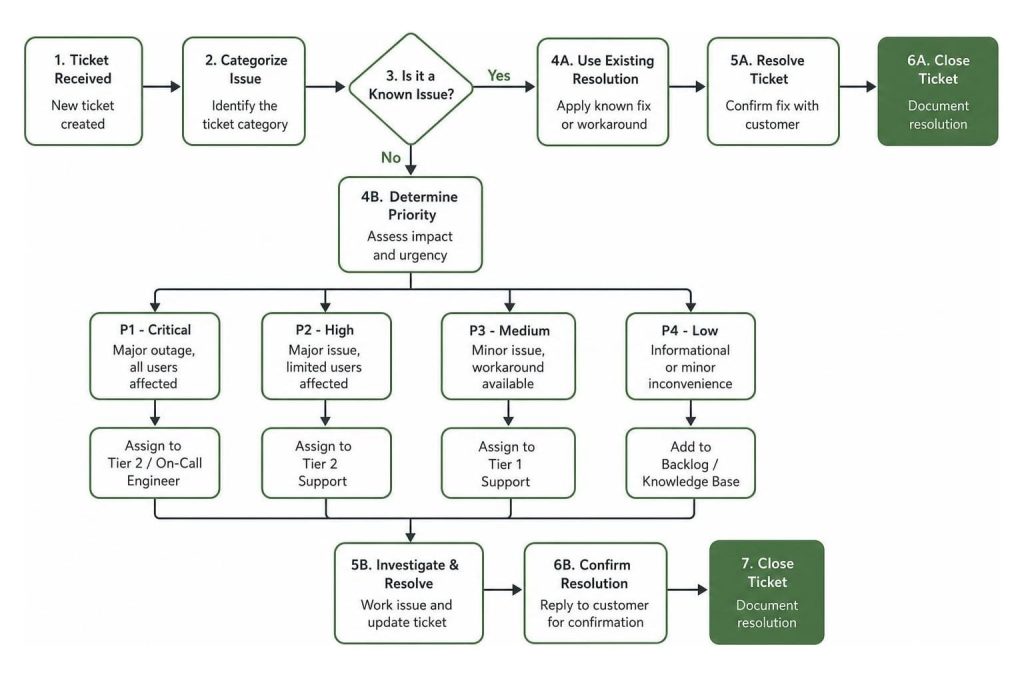
- Flowchart Format: Best for highly visual processes that involve multiple decision points and parallel paths. If a step requires a “Yes/No” decision that changes the entire direction of the workflow, a flowchart is your best option.
To help you decide which layout fits your specific operational needs, consider this comparison table:
|
SOP Format |
Best For |
Complexity Level |
Real-World Example |
|---|---|---|---|
|
Step-by-Step |
Linear, routine tasks |
Low to Medium |
Entering a new lead into your CRM |
|
Hierarchical |
Detailed, multi-step processes |
Medium to High |
Performing weekly server maintenance |
|
Checklist |
Safety checks and daily opening/closing |
Low |
Opening a restaurant kitchen |
|
Flowchart |
Decision-heavy workflows |
High |
Troubleshooting a customer technical issue |
Anatomy of a High-Converting SOP: 8 Essential Elements
To ensure your SOPs are actually followed rather than gathering digital dust, they must be highly structured and easy to read. A high-quality standard operating procedure template should contain eight core elements that guide the reader from start to finish.
- Document Control Table: This sits at the very top of your document. It includes the unique Document ID, current version number, effective date, author, and authorized approver. This is the mechanism that turns a simple shared file into a controlled, audit-ready document.
- Purpose and Scope: Clearly state why the procedure exists and exactly who it applies to. It is equally important to include an “Out of Scope” section to prevent employees from applying the procedure to the wrong situations.
- RACI Matrix (Roles & Responsibilities): Define who is Responsible for doing the work, who is Accountable for the outcome, who should be Consulted, and who needs to be Informed.
- Materials and Prerequisites: List all software, physical tools, login credentials, or environmental conditions required before starting the task. For example, if you are standardizing your invoicing, you might list your preferred Billing Software for Small Business as a prerequisite.
- Numbered Procedural Steps: Write the actual steps using the active voice and action verbs. Keep it simple: limit each step to a single action, and write for the least experienced qualified user.
- Acceptance Criteria: How does the employee know they did the job correctly? Define measurable, objective pass/fail criteria for the final output.
- Revision History Log: Track every change made to the document over time. Include the revision date, a brief summary of the changes, and the name of the person who approved the update.
- References and Appendices: Link to related SOPs, manufacturer manuals, policy documents, or external resources that provide additional context.
How to Build and Scale Your SOP Library in 2026
Creating a handful of SOPs is a great start, but scaling your business requires building a centralized, organized library. In 2026, paper binders are obsolete. Modern small businesses in cities like New York, Chicago, and San Diego manage their procedural assets using cloud-based platforms that ensure accessibility, security, and version control.

When organizing your SOP library, you must establish clear rules for document protection. Your general team members should have read-only access to the procedures they need to perform their daily tasks, while editing rights should be restricted to authorized process owners and managers. This prevents accidental edits and ensures that only approved, up-to-date procedures are followed.
To manage this growing library efficiently, many business owners leverage comprehensive Small Business Management Software to host their documents and link them directly to active projects. When planning your budget for these tools, it is wise to analyze Small Business Software Costs to find a solution that offers robust document control without draining your operational budget.
How to Customize a Standard Operating Procedure Template with AI
The rise of artificial intelligence has made creating and customizing SOPs faster than ever. Instead of staring at a blank page, you can use tools like Microsoft Copilot to generate a highly customized standard operating procedure template in seconds.
By prompting an AI assistant with your specific business context, existing emails, or rough notes, you can quickly draft a structured procedure. For instance, you can ask Copilot to format a hierarchical SOP for your onboarding process, complete with role definitions and step-by-step instructions.
If you want to combine written text with visual workflows, you can use tools like BA Copilot to generate BPMN (Business Process Model and Notation) process maps. These visual diagrams map out your written procedures into clear swimlanes, decision points, and exception routes.
Where to Download a Free Standard Operating Procedure Template
You do not have to design your document structure from scratch. There are several high-quality, professional resources available online where you can download a free standard operating procedure template:
- HubSpot: If you prefer working in cloud-based collaborative suites, you can access this Free Standard Operating Procedure Template for Google Docs & Word to quickly document your marketing, sales, and administrative tasks.
- Canva: For businesses that require highly visual procedures with custom brand colors, logos, and design elements, browse the Standard operating procedure: How-tos, templates, and tips – Canva library for creative, engaging layouts.
Operational Pitfalls: Common Mistakes That Kill Efficiency
Even with the best intentions, many small business owners make critical mistakes when rolling out their SOPs. Recognizing and avoiding these pitfalls will save your team from confusion and prevent “confident errors”—situations where an employee executes an incorrect or outdated process perfectly.

- Writing in the Passive Voice: Passive sentences like “The invoice should be sent by the account manager” create confusion. Instead, use the active voice: “The account manager sends the invoice.” This leaves zero doubt about who is responsible for the action.
- Omitting the Out-of-Scope Section: Failing to define what the SOP does not cover can lead to employees applying specialized procedures to general tasks, causing massive bottlenecks.
- Allowing SOPs to Become Outdated: An outdated SOP is worse than no SOP at all. If a software interface changes or a regulation updates, your documentation must reflect that change immediately. Schedule a recurring review cycle every 6 to 12 months to audit your library.
- Overcomplicating the Steps: Keep your instructions scannable. Steps should take between 30 seconds and 5 minutes to read and execute. If a single step takes longer, break it down into smaller sub-steps.
Frequently Asked Questions About SOPs
What is the difference between an SOP and a work instruction?
An SOP provides a mid-level overview of a complete process, outlining what needs to be done, why it is important, and who is responsible. A work instruction is a highly granular, step-by-step document that drills down into the exact mechanics of a single step within that SOP, often using visual aids, screenshots, and specific tool instructions.
How often should our business update its SOPs?
You should review and update your SOPs at least every 6 to 12 months. However, you should also update them immediately whenever you implement new software, alter your team structure, change your physical equipment, or notice recurring errors in a specific workflow. Maintaining a clear audit trail in your revision history log is vital for keeping these documents controlled.
Are SOPs legally required for US small businesses?
While SOPs are not universally mandated for every single business, they are legally required in highly regulated US industries. For example, the FDA requires documented procedures under 21 CFR Part 211 for pharmaceutical and food manufacturing, while OSHA mandates documented safety procedures for hazardous environments. For general businesses, SOPs are highly recommended to prove compliance during financial, tax, or safety audits.
Final Thoughts
Transitioning your business from a state of constant firefighting to a streamlined, automated machine requires a commitment to standardization. By implementing a consistent standard operating procedure template across your departments, you protect your company from knowledge loss, reduce costly operational errors, and set the stage for sustainable revenue growth.
Standardization is not about restricting your team’s creativity; it is about building a reliable foundation so you can focus on scaling your business, hitting lower CPL targets, and maximizing your profitability.
If you are ready to connect with industry experts, discover cutting-edge business management tools, and learn from top-tier speakers, take the next step in your business journey. Register for the Next Small Business Expo to Network and Grow Your Business and join thousands of business owners standardizing their way to ultimate success.