

Table of Contents
Video conference tips can mean the difference between losing a prospect in the first five minutes and closing a deal that transforms your quarter. For small business owners in 2026, video calls aren’t just convenient—they’re your primary sales channel, and mastering them directly impacts your bottom line.
Highlights
- Adopt the 3-Phase Client Conversion Call Framework: To move beyond “Zoom fatigue” and drive revenue, small businesses should treat video calls as a primary sales channel by focusing on strategic preparation, high-impact execution, and systematic follow-up.
- Prioritize a Single-Objective Agenda: Before the call, define one clear, client-centric goal—such as “secure agreement on deliverables”—to prevent scope creep and ensure you guide the prospect toward a firm decision.
- Eliminate Technical Friction: Conduct a tech audit 24 hours in advance; using a wired Ethernet connection and investing in a basic kit (webcam, mic, and ring light) can pay for itself in 4–6 months through increased client trust.
- Master the “Look, Listen, Lean” Method: Build rapport by looking directly into the camera lens (not the screen) to simulate eye contact, practicing active listening to catch buying signals, and leaning forward to signal physical engagement.
- Maximize Impact with Asynchronous Video: Send a personalized 1-3 minute video summary (using tools like Loom) within two hours of the call to recap key points and reinforce value, which helps cut through the clutter of a prospect’s inbox.
- Leverage AI for Sales Intelligence: Use AI note-takers to transcribe meetings and identify action items automatically, allowing you to focus 100% on the conversation rather than taking notes.
- Focus on Outcomes Over Features: The biggest mistake is presenting a list of features; instead, use the call to understand the prospect’s specific pain points and position your service as the direct solution to their problems.
Here’s the uncomfortable truth: 80% of executives say video conferencing is taking over audio conferencing as their go-to communication method. Yet most small business owners still treat video calls like glorified phone conversations. They show up unprepared, struggle with muted microphones, and wonder why prospects seem disengaged.
The real problem isn’t “Zoom fatigue”—it’s poorly executed video calls that ignore basic video conference tips, wasting everyone’s time and squander sales opportunities.
Small businesses lose qualified leads every day because of preventable mistakes: bad lighting that makes you look unprofessional, technical glitches that eat into your pitch time, and follow-ups that never happen. When you’re competing against larger companies with polished sales processes, these details matter more than ever.
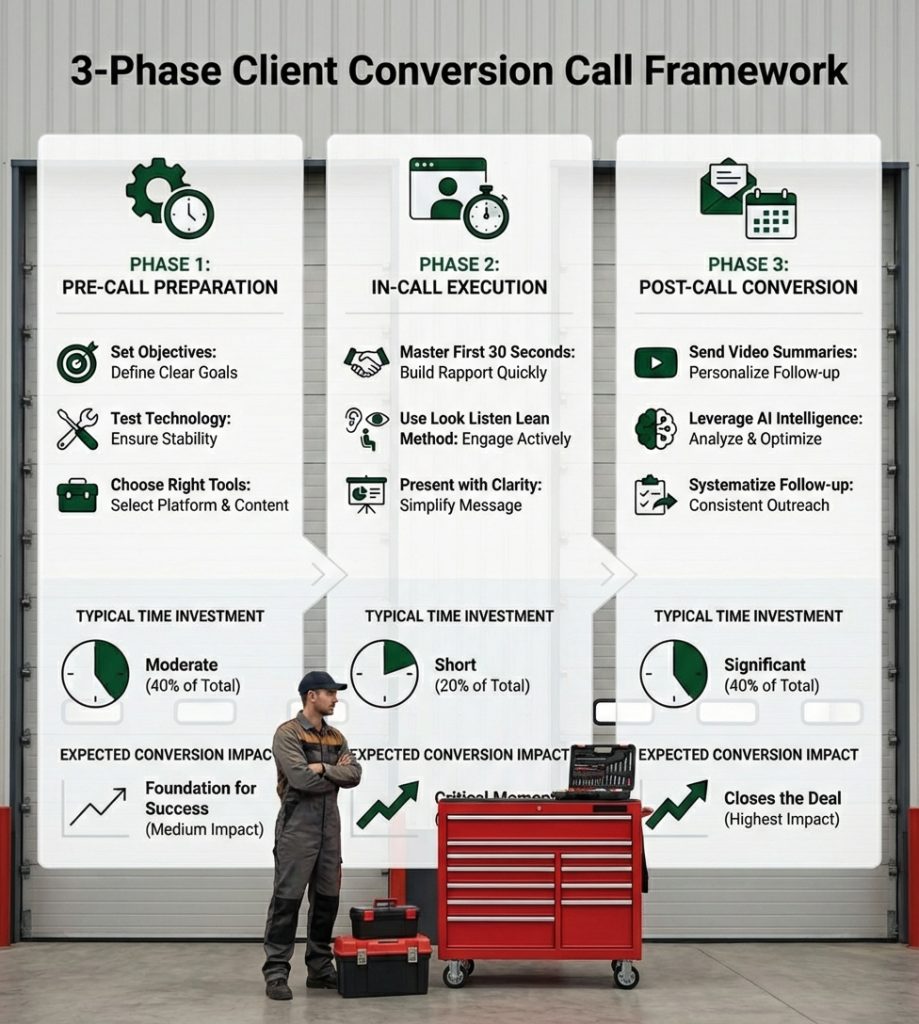
This guide introduces the 3-Phase Client Conversion Call Framework specifically designed for small business sales. Unlike generic meeting advice, this system focuses on turning video conferences into revenue. We’ll show you how to prepare like a professional (without spending hours), execute calls that keep prospects engaged (not checking email), and follow up in ways that actually close deals.
Whether you’re scheduling findy calls, product demos, or final negotiations, these video conference tips will help you compete with confidence in 2026’s digital-first marketplace.
Phase 1: Pre-Call Preparation to Set the Stage for a Sale
Imagine walking into an in-person sales meeting without knowing who you’re meeting, what you’ll discuss, or if the projector even works. Unthinkable, right? Yet, many small business owners approach video calls with exactly that level of unpreparedness. The first crucial set of video conference tips revolves around meticulous preparation. This isn’t about being rigid; it’s about being strategic, ensuring every call has the best possible chance of converting a prospect into a client. the first 10 minutes of any meeting with remote colleagues often end up being a waste of time due to technical fumbles. For a sales call, those 10 minutes are critical.
Tip 1: Craft a “Single-Objective Agenda”
Forget the sprawling, multi-point agendas of internal team meetings. For a client-facing video conference, the most impactful agenda has one clear, client-centric objective. This focus prevents scope creep, keeps the conversation on track, and ensures that by the call’s end, you’ve either achieved your goal or clearly defined the next steps.
For example, instead of “Discuss project X,” try “Secure client agreement on Phase 1 deliverables.” This clarity allows you to structure the conversation, anticipate questions, and guide the prospect toward a decision. Share this concise objective and any necessary pre-reading materials (like a brief case study or a single-page proposal) in advance. This reduces the time spent on explanations, increases client focus, and often helps reduce overall meeting length, respecting everyone’s valuable time. This is one of the most effective video conference tips for driving efficiency.
Tip 2: Conduct a “Tech & Environment Audit”
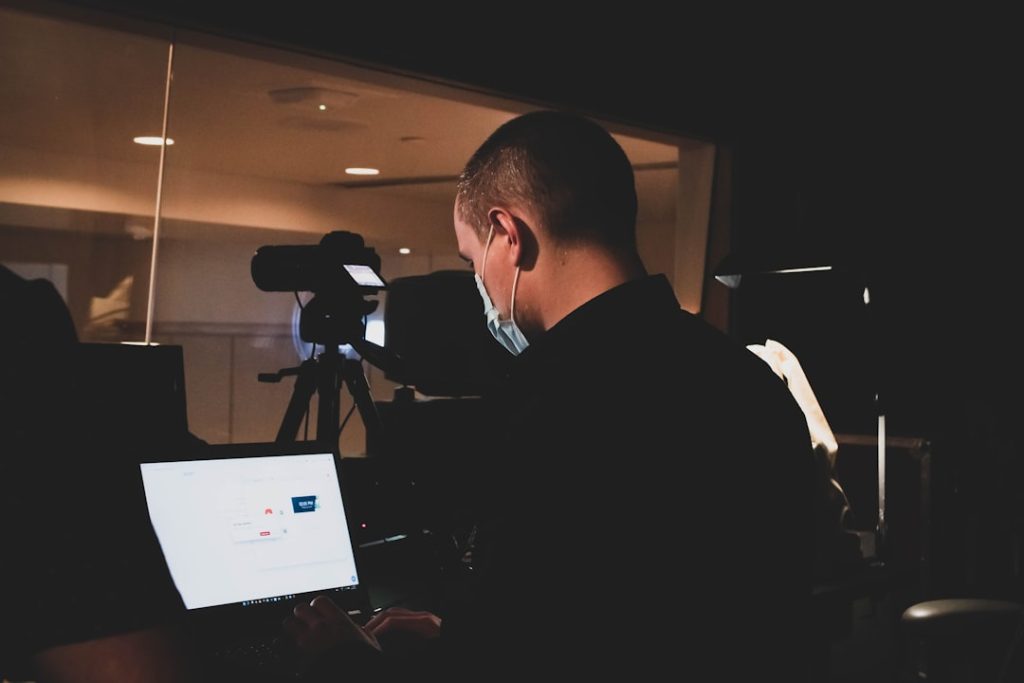
Technical glitches are conversion killers. Seventy-seven percent of workers say they’ve lost time because technical problems delayed an online meeting. For a small business, lost time means lost revenue. A thorough “Tech & Environment Audit” 24 hours before any critical sales call is non-negotiable.
First, test your audio and video. If you use Zoom, go to the Zoom site to test your audio connection or test your video connection. For WebEx users, visit your Personal Room to test your audio and video. This simple step can prevent awkward starts and demonstrate professionalism.
Second, check your internet stability. A wired Ethernet connection is always preferable to Wi-Fi, especially for high-stakes calls. Plug in your laptop to wall power to avoid mid-call battery drain, which can lead to quality degradation or disconnection.
Finally, audit your environment. Your background should be clean, professional, and free of distractions. Good lighting is paramount; aim for soft, even light coming from in front of you, not behind. Avoid backlighting from windows, which can make you appear as a silhouette. Investing in quality hardware, such as a decent webcam, an external microphone, and a simple ring light, can dramatically improve your visual and audio quality. A modest investment of $500-$2000 in these tools can pay dividends in perceived professionalism and client trust. While virtual backgrounds offer privacy, a real, uncluttered space often feels more authentic and trustworthy to a prospect. These video conference tips about technical preparedness are foundational.
Tip 3: Choose the Right Software and Hardware
The right tools can significantly improve the client experience. For small businesses operating in cities like Atlanta, Austin, Boston, or San Francisco, where clients might be anywhere, choosing reliable video conferencing software is key. Evaluate platforms based on ease of use for clients (minimal downloads, intuitive interface), robust security features, and seamless integration with your CRM or other sales tools.
For those engaging with hybrid teams, consider next-generation hardware. Devices like the Meeting Owl 3 + Owl Bar are designed to create a more immersive and natural experience, automatically highlighting active speakers and providing a panoramic view. While these might be a larger investment, they can be invaluable for small businesses with a dedicated physical meeting space. The goal is always to minimize friction and maximize clarity, ensuring your prospect’s focus remains on your solution, not on technical hiccups. Effective video conference tips include making smart tech choices.
Phase 2: In-Call Execution for Maximum Impact & Engagement
Once prepared, the next phase focuses on how you perform during the call itself. This is where you build rapport, demonstrate expertise, and keep your prospect engaged, turning a mere conversation into a compelling sales opportunity. These video conference tips are about moving beyond simply being present to actively influencing the outcome.
Tip 4: Master the First 30 Seconds
The opening moments of any sales call are crucial. They set the tone, establish your authority, and capture—or lose—your prospect’s attention. Avoid generic greetings. Instead, use a “pattern interrupt” to immediately differentiate yourself. This could be a personalized observation about their business, a quick, relevant market insight, or a concise statement of value tied to their specific challenge.
For example, instead of “How are you today?”, try “Good morning, [Prospect Name]. I noticed [specific recent company achievement or industry trend], and I’m excited to discuss how [Your Solution] can help you capitalize on that.” This demonstrates you’ve done your homework, value their time, and have a clear purpose. An energetic, confident opening sets a positive tone and builds instant credibility, crucial for small businesses looking to make a big impact. These video conference tips are about immediate impact.
Tip 5: Use the “Look, Listen, Lean” Method
This novel framework for in-call engagement helps small business owners convey presence and professionalism, even through a screen.
- Look: Maintain eye contact with the camera lens, not just the screen. This creates the illusion of direct eye contact with your prospect, making you appear more engaged, trustworthy, and present. It’s a subtle but powerful psychological cue and one of our most effective video conference tips that can significantly elevate your presence in a virtual meeting.
- Listen: Practice active listening. Don’t just wait for your turn to speak; actively process what your prospect is saying, including their non-verbal cues. Listen for buying signals, pain points, and opportunities to tailor your message. Ask clarifying questions. This shows respect and helps you understand their true needs.
- Lean: Physically lean slightly forward, especially when your prospect is speaking or when you’re making a key point. This body language subtly conveys engagement and enthusiasm. It shows you’re invested in the conversation and makes your prospect feel heard and valued.
Together, these video conference tips help build a stronger connection and rapport, essential for moving the sales conversation forward.
Tip 6: Present Like a Pro, Not a Professor
When it’s time to share your screen or present information, less is often more. Avoid dense slides filled with tiny text and overwhelming graphics. Your goal is to support your conversation, not replace it.
- Clear Screen Sharing: Ensure your screen is clean, with only the necessary applications open. Practice sharing specific windows rather than your entire desktop to avoid accidental disclosures.
- Legible Fonts: Use large, easy-to-read fonts. Prospects might be viewing on smaller screens or less-than-ideal resolutions.
- Minimalist Slides: Focus on one key idea or value proposition per slide. Use visuals effectively to illustrate points, not to distract. Emphasize value and benefits for the prospect, not just a list of features.
- Annotation Tools: Use built-in annotation tools in your video conferencing software to highlight key areas or draw attention to specific points during a demo. This interactivity is one of our key video conference tips to keep prospects engaged.
As we discuss in our blog post, Captivate Your Audience: Should Social Media Content Be Filmed Horizontal or Vertical?, understanding how visuals impact engagement is key. Apply the same principles here: clarity and impact over complexity.

Phase 3: Post-Call Conversion & Follow-Up That Closes Deals
The call might be over, but the sales process is far from it. This final phase focuses on the critical actions you take immediately after the video conference to nurture the lead, reinforce value, and ultimately convert the conversation into a closed deal. This is where many small businesses falter, letting promising leads cool off. The best video conference tips extend beyond the meeting itself.
Tip 7: Send Asynchronous Video Summaries
In a world saturated with emails, a personalized asynchronous video summary can be a game-changer. Within two hours of your call, record a brief (1-3 minute) video for your prospect.
- Recap Key Points: Briefly summarize the main discussion points, the prospect’s pain points you identified, and the solutions you proposed.
- Reinforce Value: Reiterate the specific benefits your solution offers them, tying back to their stated needs.
- Next Steps: Clearly outline the agreed-upon next steps and any action items for both parties.
- Personal Touch: This shows you value their time and attention, differentiates you from competitors, and often leads to higher engagement and response rates.
Tools like Loom or Vidyard make this incredibly easy. This strategy is one of our top video conference tips, as it significantly cuts through email clutter and reinforces the personal connection you built during the video conference.
Tip 8: Leverage AI for Actionable Sales Intelligence
Our next set of video conference tips involves smart technology. AI-powered tools integrated into your video conferencing or CRM can revolutionize your post-call process.
- AI Note-Takers: Many platforms now offer AI note-takers that transcribe your calls, identify speakers, and even summarize key discussion points. This frees you to focus entirely on the prospect during the call, rather than frantically typing.
- Identifying Action Items: These tools can flag and extract specific action items, assigned owners, and deadlines, ensuring nothing falls through the cracks.
- Analyzing Sentiment: Some advanced AI tools can even analyze the sentiment of the conversation, providing insights into prospect engagement and potential objections.
- Suggesting Next Steps: As Salesforce highlights, Agentforce can improve post-meeting follow-up by reviewing meeting minutes, identifying action items, and recommending next steps. This means less manual work for you and a more strategic, timely approach to nurturing leads.
For small business owners, leveraging AI for sales intelligence is one of the most powerful video conference tips to improve efficiency and conversion rates.
Tip 9: Systematize Your Follow-Up
The “40/20/40 rule” for meetings suggests dedicating 40% of time to preparation, 20% to the actual discussion, and 40% to follow-up. This emphasizes that effective follow-up is not an afterthought, but a core component of successful sales.
Create a clear, systematic follow-up sequence for every sales video conference. This might involve:
- CRM Reminders: Immediately after the call, schedule reminders in your CRM for your next touchpoint.
- Assigned Tasks: If there are internal tasks (e.g., preparing a custom proposal, gathering case studies), assign them with clear deadlines.
- Multi-Channel Approach: Don’t rely solely on email. Combine your video summaries with LinkedIn messages, phone calls, or even a personalized physical mailer if appropriate.
- Measuring Effectiveness: Track which follow-up methods yield the best response rates and conversion for your specific audience.
A systematized approach ensures no lead falls through the cracks and maximizes the return on your investment in every sales video conference. These video conference tips ensure consistent lead nurturing.
Essential Video Conference Tips for Professionalism
Beyond the sales-specific framework, a foundation of professionalism and etiquette is crucial for every small business owner. Whether you’re in Miami, Dallas, or New York City, these universal video conference tips build trust, improve your brand image, and ensure smooth, productive interactions.
Crucial Video Conference Tips on Etiquette
Good etiquette isn’t just polite; it’s smart business.
- Mute When Not Speaking: This is perhaps the most fundamental rule. Background noise (typing, coughing, a barking dog) is incredibly distracting. Make muting your default and unmute only when you intend to speak. Being told “you’re on mute” is a “borderline canonical experience” for remote workers, but forgetting to mute is far worse for others’ focus.
- Punctuality: Log in 5-10 minutes early. This buffer allows you to troubleshoot any last-minute technical issues and demonstrates respect for others’ time. As human resource leaders believe, soft skills like professionalism will become more valuable as employees work alongside digital teammates.
- Avoid Multitasking: While tempting, checking emails or working on other tasks during a video call is disrespectful and ineffective. Research suggests that only 3% of people can multitask effectively. Your lack of engagement will be noticeable.
- Professional Attire: Even if you’re working from home in Los Angeles or Chicago, dress as you would for an in-person meeting. It conveys professionalism and seriousness.
- Speak Clearly: Speak at a normal volume, clearly and concisely. Avoid shouting or mumbling.
- Stay Present: Minimize disruptive body movements. Avoid turning your back to the camera or making quick, jerky motions that can appear jumpy on screen. Maintain eye contact with the camera to show engagement.
For more insights, our blog post 7 Essential Hacks to Virtual Meeting Etiquette offers additional guidance. And if you need a laugh, watch A Conference Call in Real Life – it hilariously sums up common video call struggles.
More Video Conference Tips for Hybrid Meetings
The shift to hybrid and remote work has made inclusive hybrid meetings a necessity. For small businesses in locations like Phoenix, Orlando, or Washington D.C., where teams might be split between an office and home, these video conference tips are vital:
- Engage Remote Participants Actively: Remote attendees often feel like an afterthought. Periodically check in with them for questions or contributions. Ensure they are on video, not just audio, as this helps prevent them from being forgotten.
- Ensure Equal Airtime: Facilitate the discussion to ensure remote participants have equal opportunities to speak. Establish visual cues (like a raised hand emoji) or verbal protocols for speaking turns.
- Leverage Technology: Use features like chat for questions, polls for quick feedback, and shared digital whiteboards to ensure everyone can contribute. Next-generation technology like the Owl Intelligence System (OIS) in devices such as the Meeting Owl 3 helps identify and automatically highlight active speakers, providing a panoramic view that makes remote participants feel more immersed.
- Acknowledge All Attendees: Begin the meeting by acknowledging both in-room and remote attendees. This simple gesture sets an inclusive tone.
Creating an inclusive environment ensures that all team members, regardless of location, feel valued and can contribute effectively, which directly impacts project success and client satisfaction.
Turn Your Next Call into a Closed Deal
Mastering your video conferences is no longer a luxury for small businesses; it’s a critical skill for revenue growth and lead generation in 2026. By applying the 3-Phase Client Conversion Call Framework—meticulous Pre-Call Preparation, impactful In-Call Execution, and strategic Post-Call Conversion—you can transform your video calls from exhausting obligations into powerful sales engines.
These video conference tips are designed to help you overcome “Zoom fatigue,” build stronger client relationships, and ultimately, close more deals. From crafting a single-objective agenda to leveraging AI for actionable insights, each strategy is a step toward elevating your presence and productivity.
The Small Business Expo is dedicated to providing entrepreneurs in Atlanta, Austin, Boston, and across the USA with the resources and connections needed for growth. Take these video conference tips and tricks, apply them consistently, and watch your virtual meetings turn into tangible business success. Ready to grow your business? Join us at our next Small Business Expo event and connect with the tools and community you need to succeed!
Frequently Asked Questions about Video Conferencing for Sales
How do you keep a prospect engaged on a long video call?
Keeping a prospect engaged on a long video call (anything over 30-45 minutes) requires a strategic approach. The biggest mistake is treating it as a monologue. Instead, one of our best video conference tips is to break up the call into digestible segments. Use “mini-breaks” every 10-15 minutes by shifting topics, asking open-ended questions, or introducing interactive elements like polls, screen annotations, or a quick shared whiteboard session. Encourage questions throughout, rather than saving them all for the end. Schedule actual breaks for calls over 60 minutes. Constantly check in with your prospect (“Does that make sense?”, “What are your thoughts on this?”). Your energy is contagious – if you’re engaged, they’re more likely to be too.
What’s the single biggest mistake small businesses make on sales calls?
The single biggest mistake small businesses make on sales calls is focusing exclusively on their product or service features, rather than the prospect’s problems and desired outcomes. They often launch into a one-sided presentation without truly understanding the prospect’s unique challenges. This leads to a disconnect. Instead, prioritize active listening in the initial stages; this is one of the most fundamental video conference tips. Ask probing questions, uncover their pain points, and then position your solution as the direct answer to their specific needs. Build a human connection first; the sale follows. A failure to listen, and thus a failure to connect, is a red flag that can cost you the deal.
Is it worth investing in expensive video conferencing gear?
For client-facing roles, absolutely yes. While “expensive” is relative, a modest investment (starting around $500 for a quality webcam, external microphone, and ring light) dramatically improves your perceived professionalism. It signals to your prospects that you take your business—and theirs—seriously. A grainy video, echoing audio, or poor lighting can unconsciously diminish your credibility. Think of it as investing in your digital storefront. The ROI often comes within 4-6 months through improved client trust, more effective communication, and ultimately, higher conversion rates. While budget options exist, they often offer less personalization and reliability. Consider a “Pricing Transparency Checklist” when evaluating gear: clear breakdowns of features, no hidden compatibility issues, defined performance benefits, and flexible scalability as your business grows. This isn’t just about looking good; it’s about applying professional video conference tips to perform at your best and leaving a lasting, positive impression.